
Generate Elementor Widgets and WPBakery Add-ons with AI
Describe the WordPress component you need, generate it with Moduify AI, and manage it directly from your WordPress dashboard.

Turn Your Ideas into WordPress Components
Custom widgets often mean planning controls, writing PHP, styling responsive states, checking builder compatibility, and repeating the cycle for every new request.
Manual setup and builder-specific boilerplate
Design, behavior, and responsive testing
Repeated development for one-off components
Write the layout, content, controls, responsive behavior, and interactions you need.
Send the prompt through Moduify’s generation service and inspect the rendered result.
Find the generated item in the shared Moduify Library, then download and install it manually when it is ready.
Three steps from prompt to component
A focused workflow keeps connection, generation, previews, and library access in one familiar WordPress admin experience.
Connect Your Website
Install the plugin and connect your Moduify account with a connector API key created in your dashboard.
Describe What You Need
Choose Elementor or WPBakery, name the add-on, and write a prompt describing the required design and behavior.
Generate and Use
Generate the component, inspect its preview, manage it in your shared library, and manually download and install the add-on for use on WordPress.
See Moduify AI Connector in Action
The tutorial demonstrates account connection, builder selection, component generation, preview, and the shared Moduify Library workflow.
Components built for real WordPress layouts
These previews come from the connected Moduify Library and show generated Elementor widgets and WPBakery add-ons.

Testimonial Slider
A generated slider layout for presenting customer quotes in a compact component.

Pricing Table
A structured pricing component generated for comparison and offer pages.
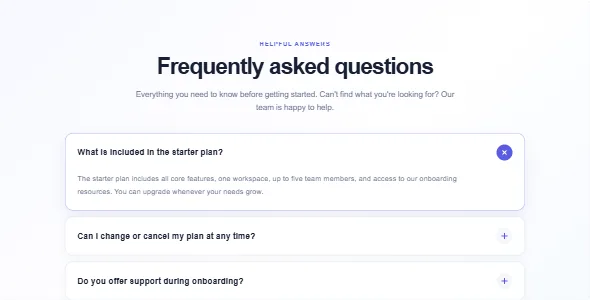
FAQ Accordion
An organized question-and-answer component with an accessible accordion pattern.

Team Member
A profile-focused widget for a team, studio, or service-provider page.
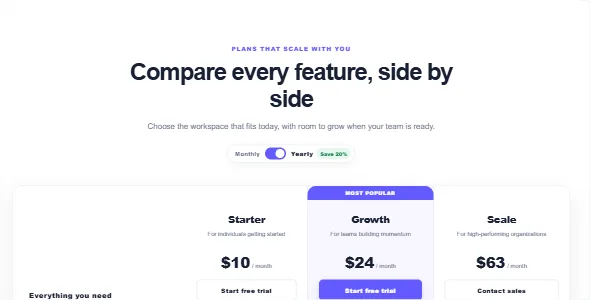
Comparison Table
A conversion-oriented plan comparison layout with a highlighted option.

Content Reactions
An interactive feedback component for articles, guides, and knowledge bases.
Everything needed for a focused generation workflow
AI Prompt-Based Generation
Describe the component’s layout, controls, behavior, and responsive requirements in plain language.
Elementor Widget Generation
Generate custom Elementor widget projects through the shared Moduify pipeline.
WPBakery Add-on Generation
Choose WPBakery to generate an add-on for that builder’s component workflow.
Component Preview
Inspect a sanitized rendered preview and switch between desktop, tablet, and mobile viewports.
Moduify Library Management
Browse item metadata, previews, builder types, and statuses from the connected account library.
Reusable Generated Components
Download selected add-ons from Moduify, then install and reuse them through the normal WordPress workflow.
Guided WordPress Connection
Connect and verify the site with a revocable connector API key from the Moduify dashboard.
Responsive Output
Generate component designs with responsive controls and inspect previews across common device widths.
Who Moduify AI Connector is for
Speed up repetitive component setup
Use a prompt-led starting point, review the generated result, and keep the final installation step under your control.
Respond to custom layout requests
Turn a client requirement into a focused Elementor or WPBakery generation workflow.
Keep generated work organized
Browse account-owned items and previews through the shared Moduify Library.
Create beyond the standard widget set
Describe a purpose-built widget and preview it before continuing to download and installation.
Generate builder-specific add-ons
Choose WPBakery in the studio and specify the layout and controls you need.
Explain the component you need
Use clear requirements to start a custom component, with manual review and installation still part of the process.
Start free. Build before you upgrade.
Moduify’s current Free plan lets users claim 10 tokens on up to five days per UTC month, for up to 50 claimable tokens monthly. No card is required, and the plan includes Elementor and WPBakery studios plus one WordPress connector API key.
10 tokens × up to 5 claim days. Current allowance verified against Moduify’s pricing page.
See the connector workflow, screen by screen
Real interface captures are used where a clean, non-sensitive screenshot was available. The complete AI Studio capture appears in the hero above, avoiding duplicate inline media, and one clearly marked builder-editor placeholder remains.

Add and verify a connector key from the Moduify dashboard.
Choose a builder, name the add-on, and describe the desired result.
Generate from the assistant panel and inspect the responsive preview area.

Browse generated item previews, builder labels, and statuses.
A real saved preview from the connected Moduify Library.
Placeholder awaiting a verified editor screenshot.
Moduify AI Connector FAQ
What is Moduify AI Connector?
It is a WordPress admin plugin that connects a site to the Moduify service through a server-side connector API key. Administrators can submit prompts for Elementor widgets or WPBakery add-ons and view library metadata and previews.
Does it work with Elementor?
Yes. Choose Elementor in the Add-on Studio to generate an Elementor widget through Moduify’s generation service.
Does it support WPBakery?
Yes. The studio also supports WPBakery add-on generation through the same connected account and library workflow.
Do I need a Moduify account?
Yes. Generation happens through the Moduify service, so a Moduify account and connector API key are required.
How do I connect my website?
Create a connector key in your Moduify dashboard, open Moduify → Connection in WordPress, paste the key, and choose “Save and test connection.”
Is there a free plan?
Yes. The current Free plan allows 10-token claims on up to five days per UTC month, for up to 50 claimable tokens monthly. Check the Moduify pricing page for the latest allowance.
Where are generated components stored?
Connector-generated items are stored in the connected account’s shared Moduify Generated Items library. The WordPress connector reads item metadata and static preview images from that library.
Where can I get documentation or support?
Visit the Moduify documentation, tutorials, or support page. Plugin-specific questions can also use the WordPress.org support forum.
Know what the connector sends
Moduify AI Connector uses an external service. A Moduify account and API key are required, and add-on downloads happen on the Moduify website.
The plugin sends the site URL, site name, WordPress version, PHP version, and plugin version so Moduify can register and verify the connected site.
The plugin sends the prompt, selected builder, component name, and connected site ID to Moduify. The connector API key authenticates server-side requests.
The generated item is saved in the shared account library. The plugin sends a static preview image to Moduify and reads library metadata and previews; it does not automatically retrieve, install, activate, or execute generated add-on code.
Ready to Build Your Next WordPress Component?
Install Moduify AI Connector and turn your ideas into custom Elementor widgets and WPBakery add-ons.